Style Property
The button's visual style.
Definition
Property "OLE.Style" as Option
Values
This property can be set to one of the following valid options:
| Value | Description |
|---|---|
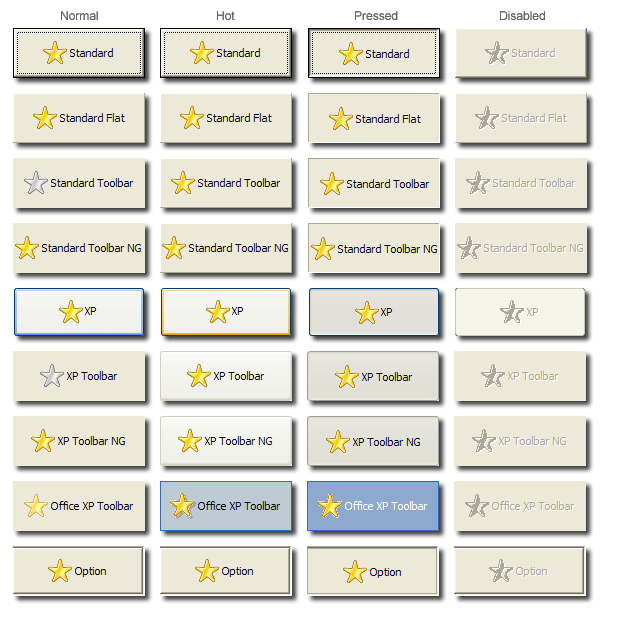
"Standard" or "STD" | A standard unthemed button |
"Standard Flat" or "FLAT" | A flat unthemed button |
"Standard Toolbar" or "TB" | An unthemed toolbar button, grayscaled at rest (Default) |
"Standard Toolbar NG" or "TBNG" | An unthemed toolbar button (NG = Non-Grayscale) |
"XP" | A standard themed button |
"XP Toolbar" or "XTB" | A themed toolbar button, grayscaled at rest |
"XP Toolbar NG" or "XTBNG" | A themed toolbar button (NG = Non-Grayscale) |
"Office XP Toolbar" or "OXP" | An Office XP toolbar button |
"Option" or "OPT" | A button suitable for setting immediately right of an EDITLINE |
"Custom Drawn" or "CD" | Uses only the Icon to draw the button |
Remarks
This property establish how the control will appear on the form. By default, it is a standard toolbar button, but you may use the button as a standard push button, an option button, and an XP button.
The XP styles allow your button to appear in the user's XP theme. If the user is not running under Windows XP, the button will default to the standard equivalent. Thus, an XP button will render as a Standard button if outside of Windows XP, the XP Toolbar will render as a Standard Toolbar, etc.
The Office XP style should not be confused with the other XP styles. The Office XP style emulates as close as possible the appearance of buttons in Microsoft's Office XP. This style is manually rendered and therefore works on any operating system.
Option Buttons
Use the Option style to create a button that is meant to be next to an edit line control. If you carefully size and position the control, you can make an edit line control with a button that appears to be inside the edit control. When using an Option button, you can only place the button on the edit line's right side.
Example
// Set the button to the XP standard button style
Set_Property(@Window:".OLE_BUTTON", "OLE.Style", "XP")

// Set the button to the Office XP toolbar button style
Set_Property(@Window:".OLE_BUTTON", "OLE.Style", "Office XP Toolbar"