Alignment Property
The image alignment within the control's bounds.
Definition
Property "OLE.Alignment" as Record
Values
This property has the following record structure:
| Pos | Name | Type | Description | Default |
|---|---|---|---|---|
| <1> | Vertical Alignment | Option | Aligns the image vertically along the top, center, or bottom of the control | Center |
| <2> | Horizontal Alignment | Option | Aligns the image horizontally along the left, center, or right of the control | Center |
Remarks
The Alignment property aligns the image along any edge of the control. This multivalued property has two fields: vertical alignment and horizontal alignment. Possible values for vertical alignment are:
| Value | Abbr. | Description |
|---|---|---|
| Top | T | Places image along the top of the control |
| Center | C | Places image in the vertical center of the control |
| Bottom | B | Places image along the bottom of the control |
Possible values for horizontal alignment are:
| Value | Abbr. | Description |
|---|---|---|
| Left | L | Places image along the left side of the control |
| Center | C | Places image in the horizontal center of the control |
| Right | R | Places image along the right side of the control |
Use both fields to positoin the image anywhere within the control.
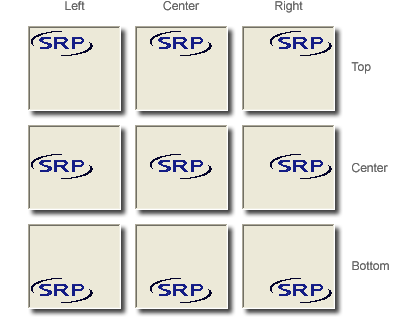
This property is ignored if the Layout property is set to anything other than "Clip".
Example
// Align the image to the control's top left sides
Set_Property(@Window:".OLE_PICTURE", "OLE.Alignment", "Top":@FM:"Left")