BackgroundColor Property
The control's background color.
Definition
Property "OLE.BackgroundColor" as Fill
Values
This property can be any Color Fill value.
Remarks
The BackgroundColor property establishes the background color for the control. This is the color seen behind the control's image, and it is also the color that shows through transparent images. Set this property to "None" if you want a truly transparent picture control, i.e., if you want the parent window's background to show through.
Examples
The following code creates a non-transparent picture control with a beveled border:
Set_Property(@Window:".OLE_PICTURE", "OLE.Image", "c:\SRP Logo Big.bmp")
Set_Property(@Window:".OLE_PICTURE", "OLE.BorderType", "Bevel Sunken")
Set_Property(@Window:".OLE_PICTURE", "OLE.BackgroundColor", "3DFace")
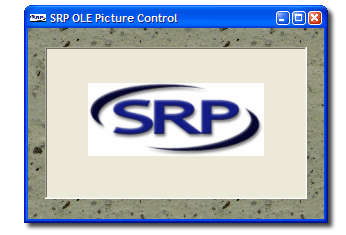
The following code creates a transparent picture control with a beveled border:
Set_Property(@Window:".OLE_PICTURE", "OLE.Image", "c:\SRP Logo Big.bmp")
Set_Property(@Window:".OLE_PICTURE", "OLE.BorderType", "Bevel Sunken")
Set_Property(@Window:".OLE_PICTURE", "OLE.BackgroundColor", "None")